ANDROID OS is awsome & android devices are also awsome but after some time it starts giving you lag performance whether it is S1 S4 or Karbon A5 . So now i will give you some tips to improve performance of ANDROID devices.


1st
OPTIMIZE YOUR HOME SCREE
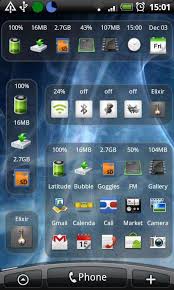
Most people like LIVE WALLPAPER and widgets on there home screen which looks very beautiful but the thing you know is that it slows down the processing of your device so don't use these things on your phone's homescreen .
2nd
BACKGROUND APPLICATIONS
2nd
BACKGROUND APPLICATIONS
Live Wallpaper
Keep an eye on applications that are running in background .Alaways close the applications after use dont minimise the apps after use ,some people thinks after pressing home keys exits the app but it just minimises because the multitasking feature of phones .It kills your battery and CPU too, so to exit the app open TASK MANAGER and select the app which you want to kill and click on end button.
3rd
LAUNCHERS
We generally installs launchers in our phones to make it looking beautiful and to add some functions and add visual effects but it uses more RAM and slows down your device,so never install launcher.
4th
Startup Cleaner
Whenever your Android device boots there are many apps which get started at the booting time of the device from many of them are installed by your device hardware company and many are from the telecommunication company also. But these apps are important which provides you the basic function of your device. But when you install the custom appssome of them are also started in the booting time which are not necessary so if we kills them at the booting you can increase a your device performance a lot.

To remove these unwanted apps starting at boot time, you have to install app named as "Startup cleaner". From this app you can control everything to kill any app at booting time you Select that app from Start up cleaner and click on "Batch Prevent Default". But don't kill the apps for that you are not sure just Google the function of the app then only kill any app.
5th
UPDATING
Never neglect any update of any app because it is very useful to get new featutes ,new graphics and also to fix bugs.
Hope you will love it


No comments:
Post a Comment